
Page Overview
Contents
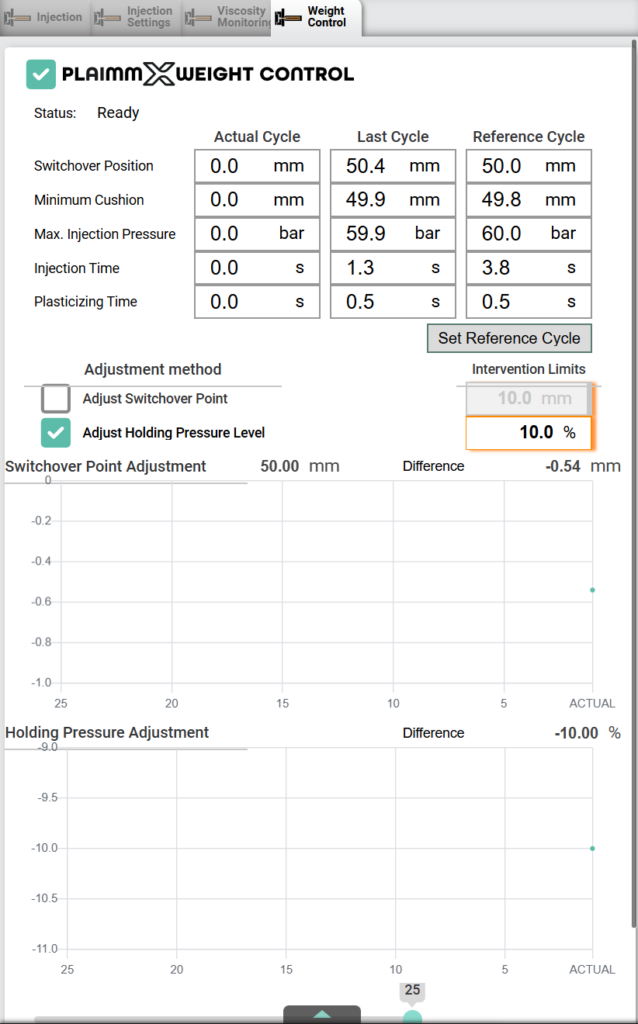
✅ Enable of the function

Status of the function

This status message shows the current state of the weight control function, helping the operator understand whether the system is ready, active, or requires action.
Status Messages:
- Disabled
The weight control function is currently turned off. No automatic adjustments will be made. - Ready
The system is prepared to activate weight control but has not started adjusting yet. The reference data is set, and the system is standing by. - Weight Control is active
The function is fully operational. Reference values are valid, and the system is actively adjusting parameters to stabilize part weight. - Inactive / Injection Recipe Data Change / New Reference Shot Needed
The function is temporarily inactive due to one of the following reasons:- No reference data is available
- Injection parameters (such as speed, pressure, or time) have been changed
- A new reference shot must be set to resume weight control
Cycle Data
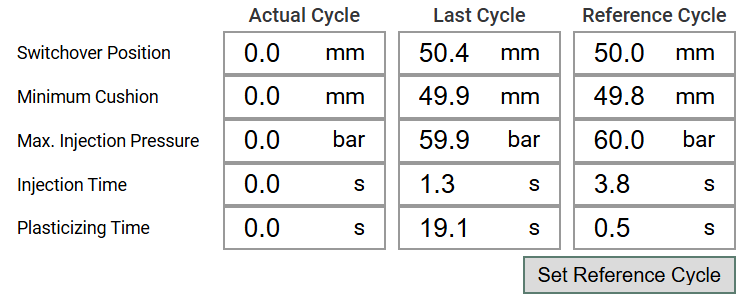
- Actual Cycle
Displays real-time data from the currently running cycle. All values begin at zero at the start of each cycle and update as the cycle progresses.
- Last Cycle
After the injection process is completed, the data from the Actual Cycle is automatically copied here.
- Reference Cycle
- With the button “Set Reference Cycle”, the value on “Last Cycle” will be copied to “Reference Cycle”.
- Reference Cycle contains the predefined reference values used to stabilize product weight. These target values help ensure consistent shot weight.
- Button : Set Reference Cycle
- 그만큼 Set Reference Cycle button is used to copy the data from the Last Cycle into the Reference Cycle.
- 목적
- This function is used to update the reference values that help stabilize the product weight and ensure consistent quality during production.
Button : Set Reference Cycle
- 그만큼 Set Reference Cycle button is used to copy the data from the Last Cycle into the Reference Cycle.
- Purpose:
- This function is used to update the reference values that help stabilize the product weight and ensure consistent quality during production.
- When to Use:
- After a stable and acceptable injection cycle has been completed
- When setting up a new mold or production condition
- When any injection parameters are changed
- How It Works:
- Complete an injection cycle with satisfactory results.
- Review the values in the Last Cycle column.
- 클릭하세요 Set Reference Cycle button.
- The values from Last Cycle will be copied to Reference Cycle and used as the new target for weight control.
Adjustment Method and Intervention Limits

This section allows the user to select automatic adjustment method and set intervention limits for the process.
Adjustment Method
- ✅ Adjust Switchover Point
When this option is enabled, the system is allowed to automatically adjust the switchover position during the injection phase.- If the switchover type is position-based, the value will be adjusted in millimeters (mm).
- If the switchover type is time-based, the input field changes to reflect a time setting (seconds).
- ✅ Adjust Holding Pressure Level
When this option is enabled, the system is allowed to automatically adjust the holding pressure level during the packing phase. The adjustment is made in percentage (%) relative to the current setting.
Intervention Limits
- Defines the maximum range within which automatic adjustments are allowed.
- 을 위한 holding pressure, the limit is shown as a percentage (e.g., 10.0%), meaning the function can increase or decrease the holding pressure level by up to 10% from the user setting.
- 을 위한 switchover point, if enabled, the limit is shown in millimeters (e.g., 10.0 mm) or seconds depending on the switchover type.
Trend Graph – Switchover Point & Holding Pressure Adjustment
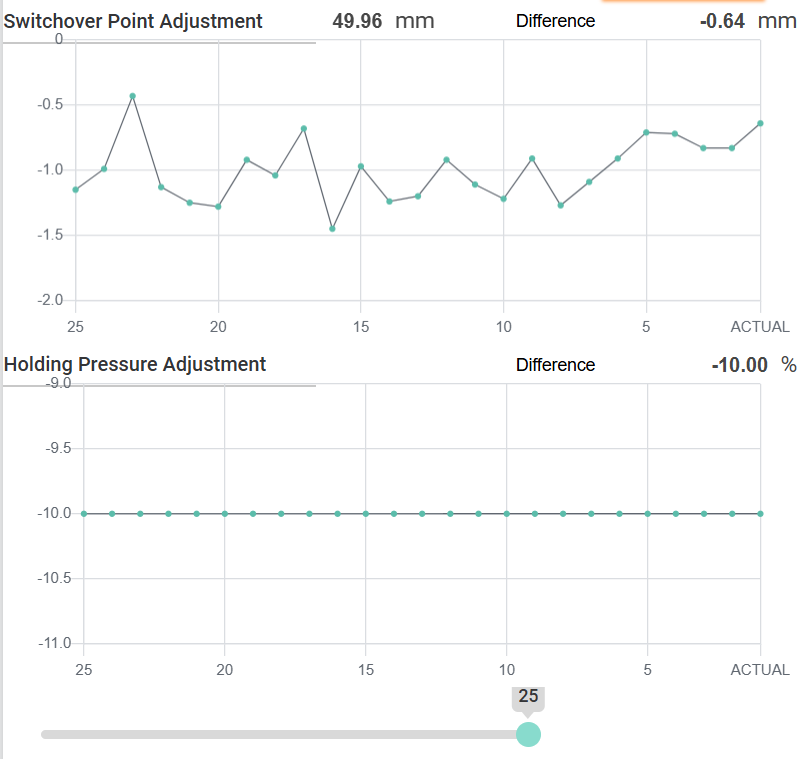
This graph shows the trend of the last 25 production cycles, visualizing how the system has automatically adjusted process parameters to stabilize product weight.
Switchover Point Adjustment
- The graph displays the adjusted switchover position for each of the last 25 cycles.
- 그만큼 current adjusted switchover point is 49.96 mm, with a difference of -0.64 mm compared to the user-defined reference value(50mm).
- This means the system has reduced the switchover point slightly to stabilize product weight.
Holding Pressure Adjustment
- This graph displays how much the holding pressure was adjusted (as a percentage) relative to the user setting.
- In this example, the system applied a consistent -10.00% holding pressure adjustment, indicating that a lower pressure was used to maintain stable part weight.
Cycle Range Selector
- 그만큼 slider below the graph allows users to change the number of displayed cycles, ranging from 25 to 250.
- This helps in analyzing short-term or long-term trends in parameter adjustments.
Button “Reset All”
그만큼 Reset All button is used to initialize all stored data and reference cycle data.
Functionality:
- Clears all historical data on the trends.
- Resets the Reference Cycle values.
- Useful for starting fresh after process changes, mold changes.
Important Note:
Use this function with caution, as all current reference data and adjustment history will be permanently deleted.