
Spare Part Request Procedure Manual
(Based on Woojin Machine Database – WJMDB)
1. Register the Service Issue
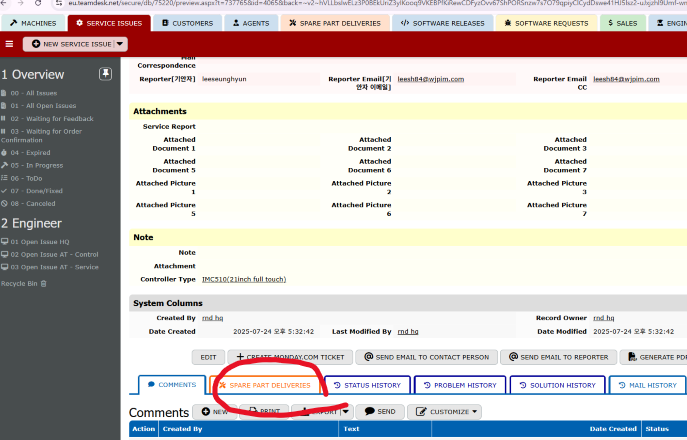
- When a problem occurs, go to the SERVICE ISSUES tab and click NEW SERVICE ISSUE.
- Fill in all relevant information, including:
- Description of the issue
- Attached documents or photos
- Controller type
- Once saved, a Service Request Number (e.g., 10003304) will be generated.
2. Create a Spare Part Request
- Go to the SPARE PART DELIVERIES tab.
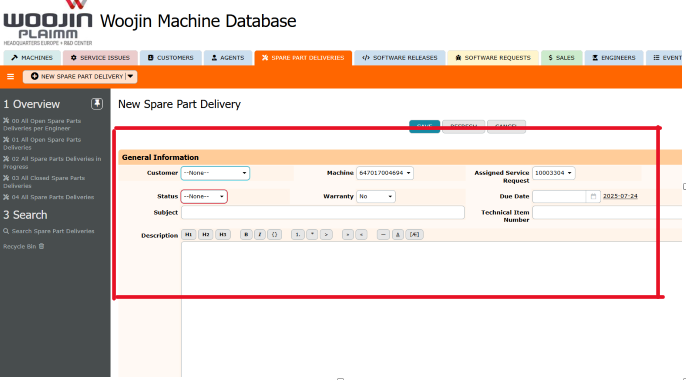
- 딸깍 하는 소리 NEW SPARE PART DELIVERY.
- Fill out the required fields:
- Machine: Select the machine number (must be pre-registered in WJMDB).
- Assigned Service Request: Link the previously created service issue number.
- Subject: Enter the title of the request.
- Description: Provide detailed specifications of the required parts
📌 Important: Clearly specify dimensions, model numbers, or part names.
Incomplete or vague descriptions may result in incorrect parts being shipped. - Warranty: Indicate whether the request is under warranty.
- Due Date: Input the requested delivery date.
3. Processing by HQ
- Once the spare part ticket is submitted, the HQ team will review the request.
- HQ fills in the Shipping Information, including:
- Delivery note and transport documents (file upload)
- Tracking number
- Shipping address and shipping company
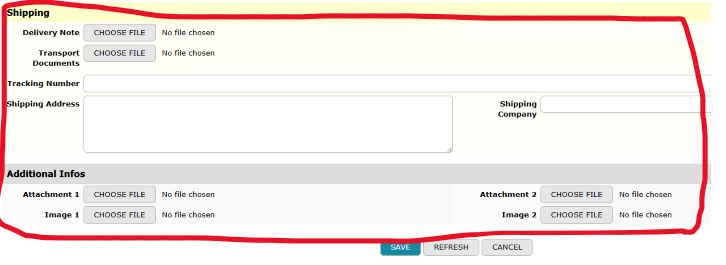
- After saving the shipping details, HQ will notify the original requester.
4. Notes
- Always link the correct service issue and machine number to ensure accurate processing.
- Optionally assign a responsible engineer or specify a technical item number for better traceability.
- Attaching images or part diagrams helps expedite verification and approval.