


 | The product design allows the battery to be changed with the B&R device switched either on or off. In some countries, safety regulations do not allow batteries to be changed while the module is switched on. |
| Any BIOS settings that have been made will remain when the battery is changed with the power turned off (stored in nonvolatile EEPROM). The date and time must be reset later since this data is lost when the battery is changed. |
| The battery is only permitted to be replaced by a Renata CR2477N battery. The use of another battery may present a risk of fire or explosion. The battery may explode if handled improperly. Do not recharge, disassemble or dispose of in fire. |
- Disconnect the power supply to the B&R Industrial PC.
- Touch the housing or ground connection in order to discharge any electrostatic charge from your body.
- Remove the cover from the battery compartment and carefully pull out the battery using the removal strip.
- The battery should not be held by its edges. Insulated tweezers may also be used to insert the battery.
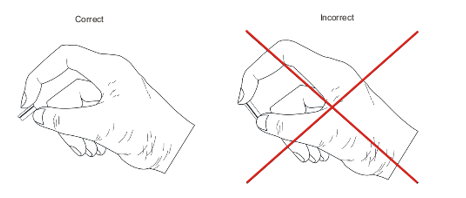
- Insert the new battery with the correct polarity.
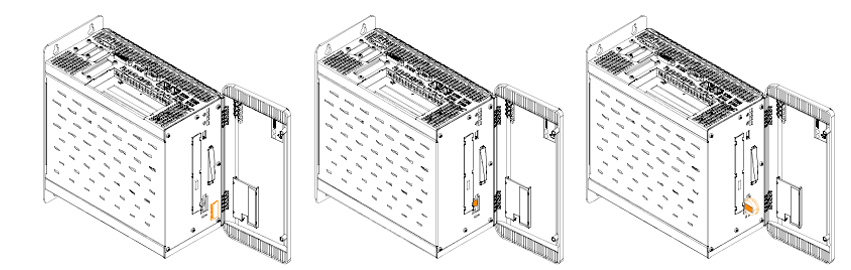
- To make the next battery replacement easier, be sure the removal strip is in place when inserting the battery.
- Reconnect the power supply to the B&R Industrial PC (plug in the power cable).
- Reset the date and time in BIOS.
 | Lithium batteries are considered hazardous waste. Used batteries should be disposed of in accordance with applicable local regulations. |