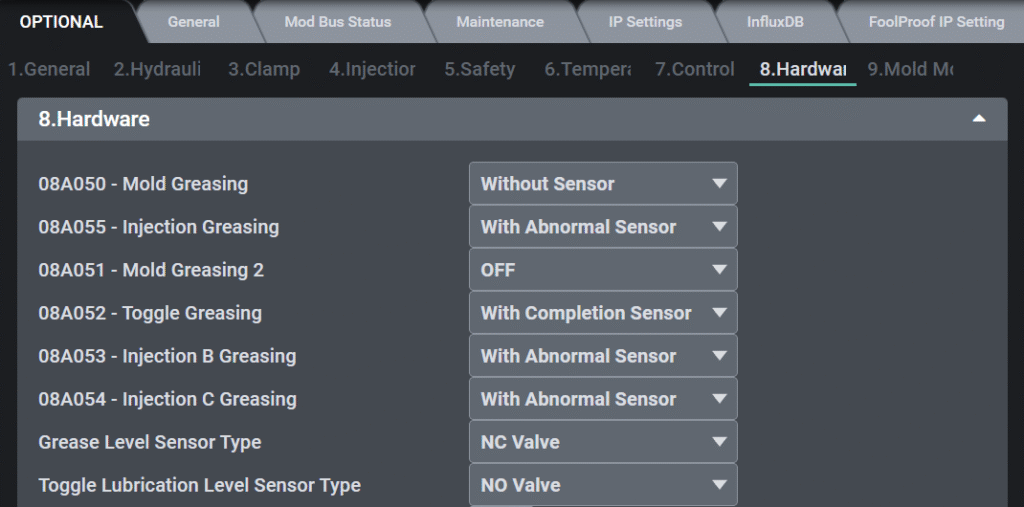
This page allows the user to configure lubrication (greasing) settings for different parts of the machine. There are six different greasing zones available, and each zone can be individually set based on the machine’s needs.
Details of Fields on the Page:
Option Name
Description
08A050 – Mold Greasing
Grease settings for the mold section.
08A055 – Injection Greasing
Greasing for the injection unit.
08A051 – Mold Greasing 2
Second grease point for mold, possibly for complex molds.
08A052 – Toggle Greasing
Greasing for the toggle mechanism.
08A053 – Injection B Greasing
Additional greasing for the injection system.
08A054 – Injection C Greasing
Another additional greasing for the injection unit.
Grease Level Sensor Type
Type of sensor used to detect grease level. (NC Valve = Normally Closed Valve, NO Valve = Nomally Opened Valve)
Toggle Lubrication Level Sensor Type
Type of sensor used to detect toggle lubrication level. (NC Valve = Normally Closed Valve, NO Valve = Nomally Opened Valve)
Function Availability by Machine Type
Category
DL
TH
TE
TL
Mold Grease Unit
Standard
Optional
Optional (for models > TE450)
Optional
Injection Grease Unit
Optional
Optional
Standard
Optional
Mold 2 Greasing
Optional
N/A
N/A
N/A
Injection B Grease
Optional
Optional
Optional
Optional
Injection C Grease
Optional
Optional
Optional
Optional
Toggle Unit Grease
N/A
Standard
Standard
N/A
Grease Distribution Sensor
Clamping only
N/A
N/A
N/A
Grease Completion Sensor
N/A
N/A
Standard
N/A
Grease Level Low
N.O type
N.O type
N.C type
N.O type
Toggle Lubrication Level
N/A
N.O type
N.O type
N/A
Configuration Options per Greasing Zone:
Each lubrication point (e.g., Mold, Injection, Toggle) can be set with one of the following four options from a dropdown menu:
OFF → Greasing is disabled for this zone.
Without Sensor → Lubrication operates for a set duration, without using any sensor feedback.
With Abnormal Sensor → Uses a sensor that detects abnormal conditions in the greasing unit.
With Completion Sensor → Uses a sensor to detect when lubrication is successfully completed.
Sensor Type Descriptions
With Abnormal Sensor
During greasing, if the sensor signal changes, it is interpreted as normal greasing operation.
If the signal does not change at all during the greasing time, the system assumes there is a problem with the greasing unit and triggers an alarm.
With Completion Sensor
During greasing, if the sensor signal is received, the system immediately ends greasing (considered complete).
If the sensor signal is not received during the greasing time, it is treated as a greasing failure, and an alarm is triggered.
Interface of Greasing (Lubrication) User Page
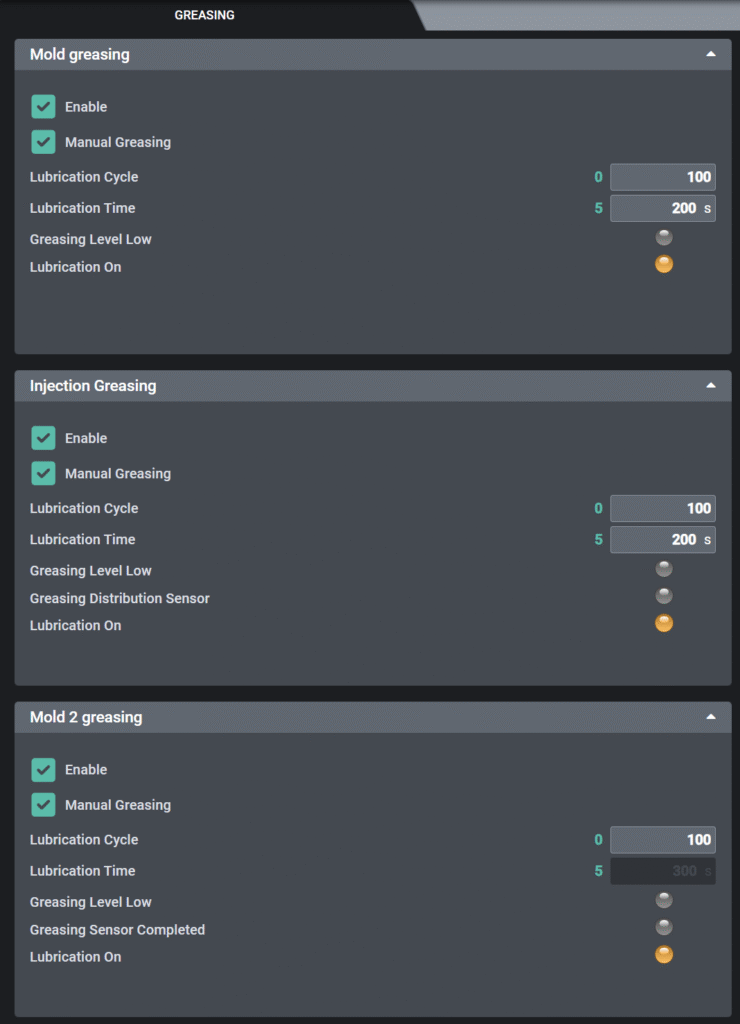
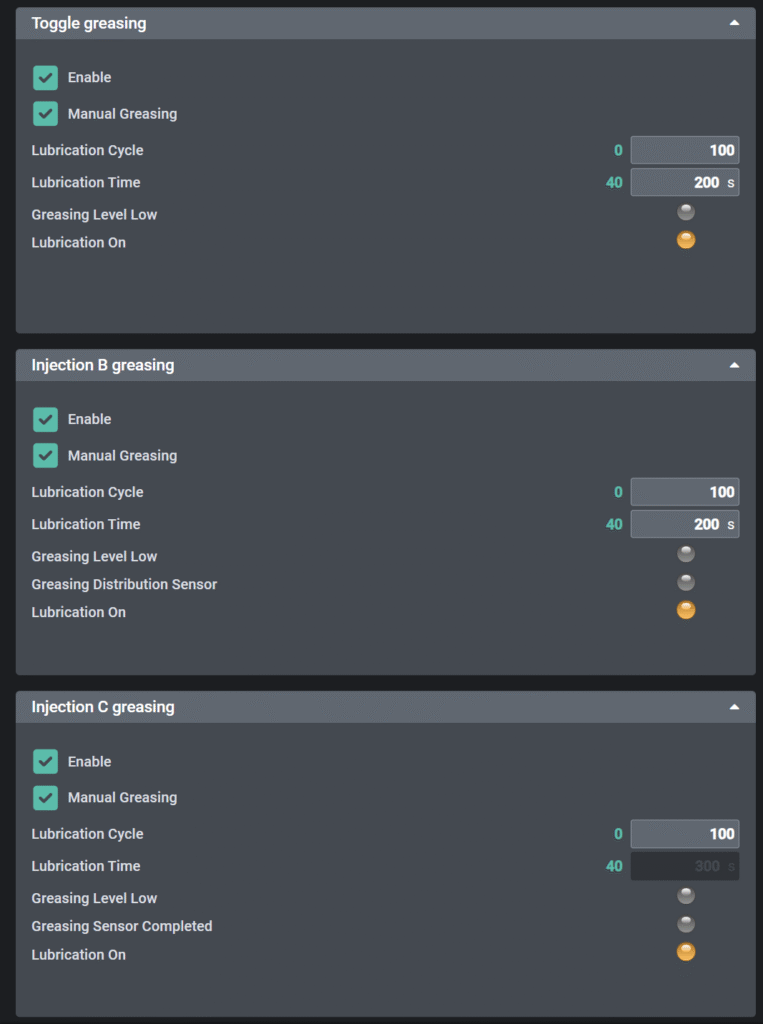
This screen displays the active greasing units based on the options configured in the machine settings.
General Behavior:
Only greasing units set to active (not OFF) in the machine options screen are displayed here.
If a greasing unit is set to OFF on Fixdata page, it does not appear on this screen.
When the “Enable” checkbox is selected, the corresponding greasing unit is activated
The “Manual Greasing” checkbox allows the user to choose which units will operate when the manual lubrication button (located in the screen footer) is pressed.
Parameters & Indicators:
Item
Description
Lubrication Cycle
Determines how often the greasing unit is activated during automatic production (e.g., every 100 cycles).
Lubrication Time
Duration (in seconds) for the greasing unit.
Greasing Level Low
Indicates the grease tank level. If the signal is received, it means grease is low and needs refilling.
Greasing Distribution Sensor
Confirms whether the grease distribution process is working properly. It checks if the lubrication action has occurred successfully.
Grease Sensor Completed
Shows the status of the completion status. If a signal is received, it means greasing has been successfully completed.
Lubrication On
Shows the current output status of the greasing unit



Please upload to UF1, UF3 trunk version. I will test it.