


The predictive grease level system calculates how much grease has been discharged, shows the remaining volume, and warns operators before levels get too low. After refilling, a single button resets the system. This allows planned refilling and prevents unexpected downtime due to grease depletion.
1. Machine Option

2. Macine Settings (General / Maintenance)
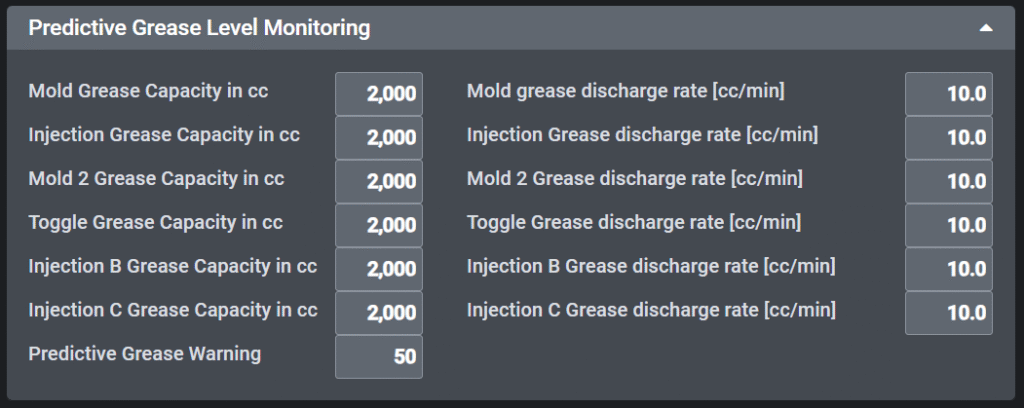
- Set Maximum Grease Capacity
- For each lubrication device (e.g., Mold, Injection, Mold 2, Toggle, Injection B/C, etc.), enter the maximum grease capacity.
- Example:
2000 (cc)
- Set Grease Discharge Rate
- Define the grease discharge rate for each device.
- Example:
10.0 (cc/min)
- Set Alarm Threshold
- Set a warning level that will trigger an alarm when the remaining grease drops below this value.
- Example:
50(cc)
| Grease Pump Model | Maximum Grease Capacity (cc) | Grease Discharge Rate (cc/min) |
|---|---|---|
| HGP-20MG | 700 | 10 |
| HGP-16 | 2000 | 16 |
3. User Settings (Greasing)
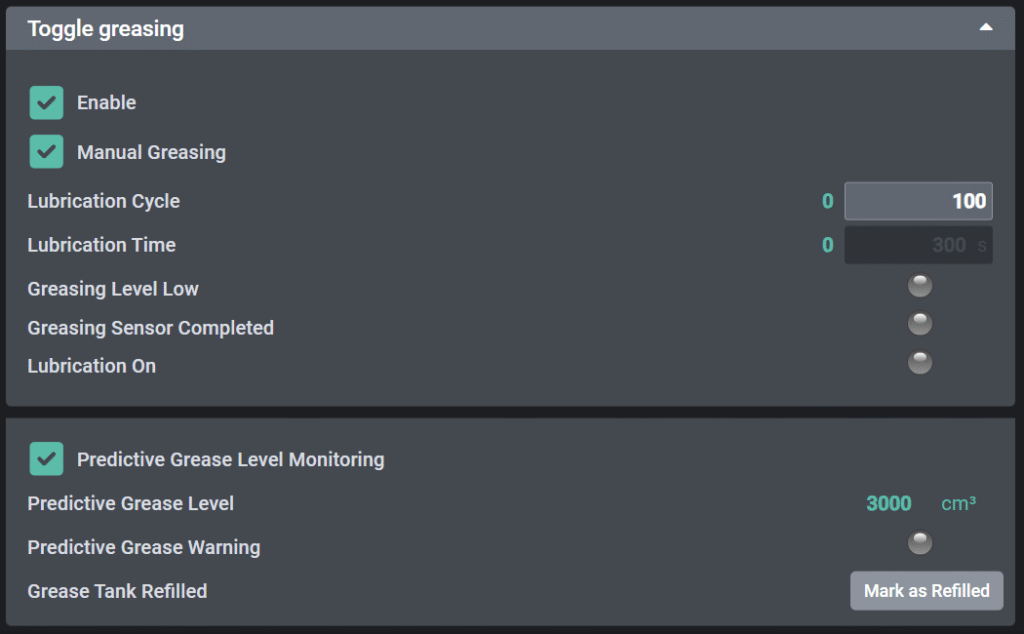
- Operating Principle
- When the machine performs automatic greasing or manual greasing,
- It calculates the total discharged grease based on the discharge rate and greasing duration.
- The remaining grease is estimated as:
Remaining Grease = Maximum Capacity – Total Discharged Volume - If the remaining grease falls below the warning threshold, a warning indicator is activated and warning message will be displayed
- User interface
- Predictive Grease Level: Shows the calculated remaining grease in real-time (or at the end of a greasing cycle).
- Predictive Grease Warning:
- Normal: Remaining grease is above the warning level
- Warning: Remaining grease is below the threshold (indicated with a orange color)
- Grease Tank Refilled: After refilling the tank, press “Mark as Refilled” to reset the grease level to its maximum capacity.
- Warning message
- Warning as information
- Automatic reset after refilled.
