


- Author: Park Wihoon
- Version: REV-1.0
- Date: 2026-03-09
- Department: Control Design Team 1
- Usage: Internal Use Only
1. Overview
This manual describes the configuration and operation of the Clamp Stopper Release Function.
The function is used to resolve a condition where the clamp stopper is stuck due to missing unlock signals.
2. Function Structure
2.1 Monitoring Time Setting (Rotary Page)
- Location: Rotary Setting Page
- Parameter: Clamp Stopper Monitoring Time
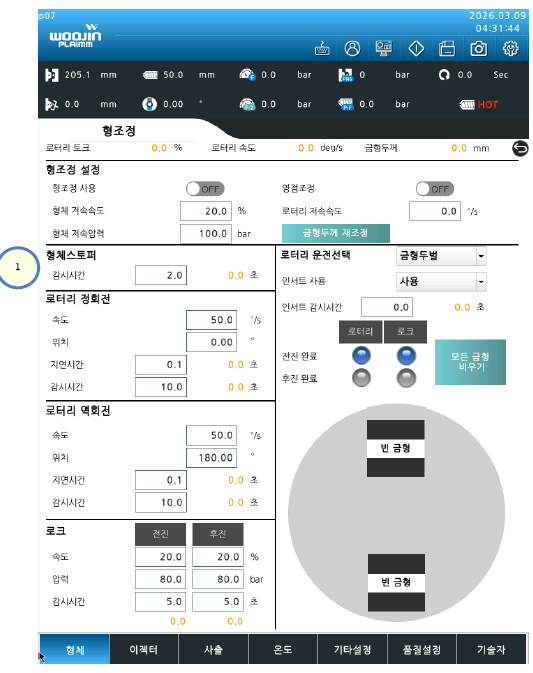
Description
- If Left/Right Clamp Stopper Unlock signals are not detected:
- The system determines that the stopper is stuck.
- A timer starts.
- If the timer exceeds the configured monitoring time:
- An alarm is triggered.
Recovery Procedure
- Alarm 발생
- Alarm Reset 수행
- Mold Open Key 재입력
- Clamp 상승 → Stopper 끼임 해제
3. Operation Conditions
- This function is available only in Manual Mode
- Initial setup requires monitoring time configuration
4. Release Operation Setting (Expert Page)
- Location: Expert Setting Page
Adjustable Parameters
| Parameter | Description |
|---|---|
| Release Speed | Speed applied during stopper release |
| Release Pressure | Pressure applied during stopper release |
| Release Distance | Movement distance for stopper release |
5. Release Recipe Configuration
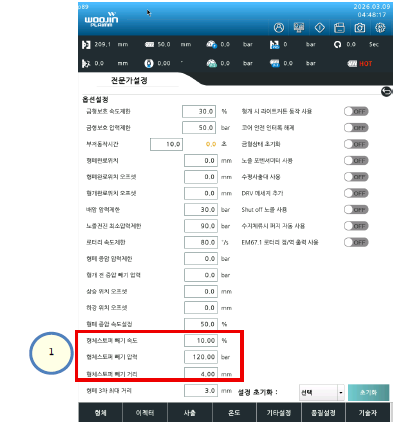
The stopper release operation can be customized using the following parameters:
- Speed
- Pressure
- Distance
This allows controlled execution of the release motion depending on the condition.
6. Key Logic Summary
- No Unlock Signal → Start Timer
- Timer Overrun → Alarm 발생
- Alarm Reset 후 Mold Open 수행 → 자동 해제
7. Notes
- Function is intended for abnormal stopper conditions
- Improper parameter setting may lead to insufficient release or mechanical stress
- Use conservative values during initial setup